
日本語
Windows 版と同じ配置番号で遊べるフリーセル。無制限アンドゥとヒントつき、広告なし・オフライン完結の一人用ソリティアアプリ。
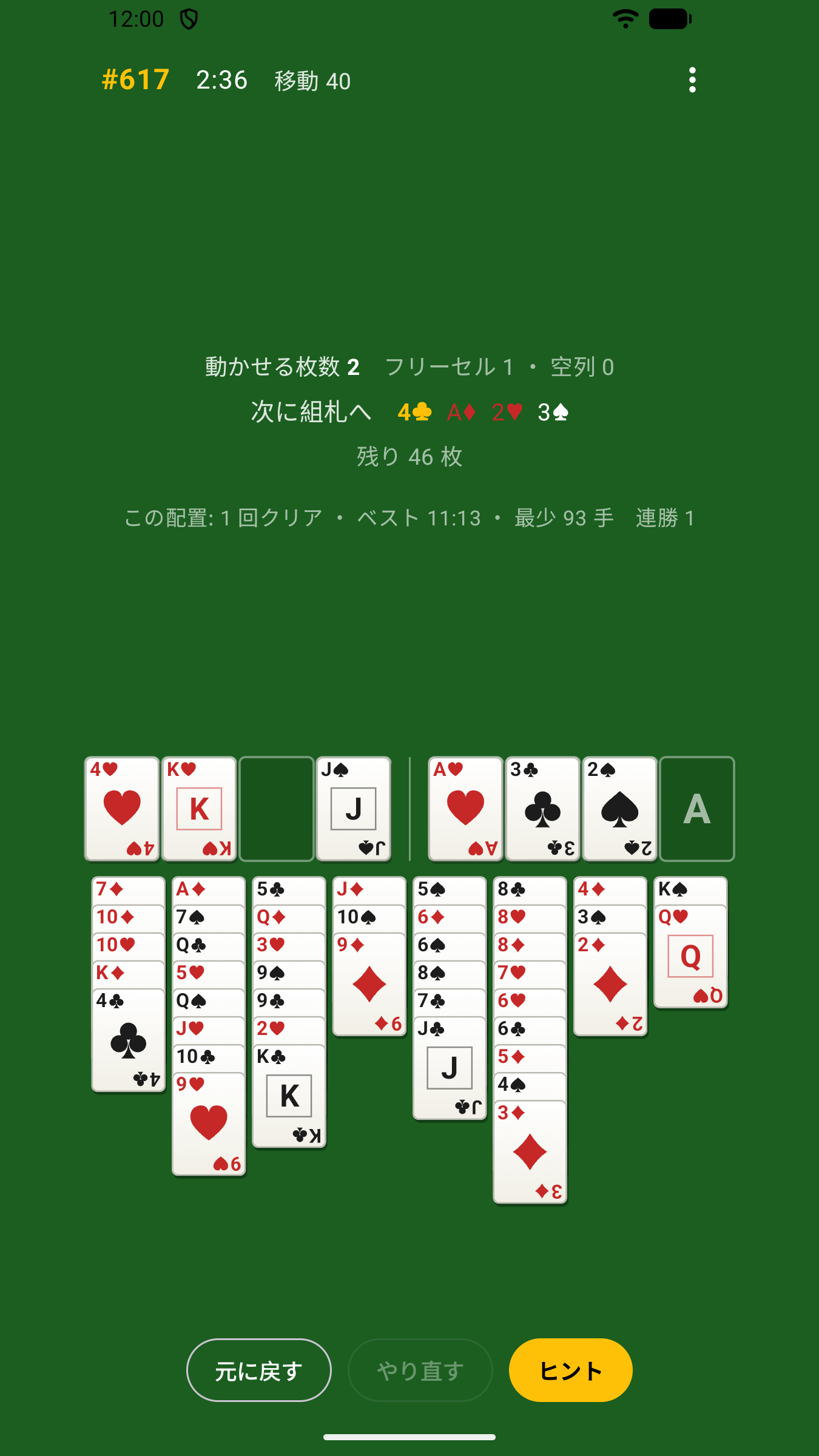
キリンフリーセルは、配置番号 #1〜#1,000,000 が Microsoft FreeCell と同じ配置になる一人用のフリーセルです。「#11982 は本当に解けないの?」「あの番号をもう一度」――懐かしい配置をスマートフォンで何度でも遊べます。
ダウンロード
- Google Play: キリンフリーセル – Google Play(準備中)
- App Store (iPhone): 準備中
特徴
- 広告なし・課金なし — ゲームだけに集中できます
- オフライン完結 — インターネット接続は不要。通信も行いません
- 個人情報を収集しません — アカウント登録も不要です(プライバシーポリシー)
- Windows 版と同じ配置 — 配置番号 #1〜#1,000,000 は Microsoft FreeCell と同じ。番号を指定して開始できます
- 無制限のアンドゥ/リドゥ — 何手でも戻せます。「初めに戻す」で最初の盤面へ、同じ配置でのやり直しもワンタップ
- 組札への自動移動 — もう場に必要のないカードは自動で組札へ(設定でオン/オフ)
- ヒント — ソルバーが見つけた「本当に解ける次の一手」を盤面上で示します。動かせる手がなくなったときはお知らせします
- 解き方の案内 — 行き詰まったら「解き方を見る」で、クリアまでの手を 1 手ずつ盤面上で案内します(自動再生も可)
- タップでもドラッグでも — まとめて動かせる枚数(スーパームーブ)は自動で計算
- 統計 — 勝率、連勝、ベストタイム、最少手数、配置ごとのクリア記録
- 途中経過を自動保存 — アプリを閉じても「つづきから」で再開できます
- 左利きモード — フリーセルと組札の左右を入れ替えられます
- 画面を消灯しない — 考えている間に画面が消えないよう、プレイ中は最後の操作から一定時間(既定 5 分)画面を点灯したままにします(設定で変更可)
遊び方
- 「新しいゲーム」でランダムな配置から、または「番号を指定」で配置番号を入力して始めます
- カードをタップして選び、移動先の列・フリーセル・組札をタップします。選んだカードをもう一度タップすると最適な場所へ移動します。ドラッグでも動かせます
- 列の途中からタップすると、そこから下の「赤黒交互・降順」の連なりをまとめて動かします。一度に動かせる枚数は(空きフリーセル + 1)× 2^(空き列)までです
- 手詰まりになったら「ヒント」で次の一手を、「解き方を見る」でクリアまでの手順を 1 手ずつ確認できます(解き方を使ったゲームは成績に記録されません)
- 4 つの組札に A から K まで積み上げればクリア。「同じ配置」で別の手順を試したり、「新しい配置」に進んだりできます
対応環境
- Android 8.0 以上
- iOS 17 以上(iPhone)
- 表示言語: 日本語
お問い合わせ
ご意見・不具合のご報告は customer-hotline@lichtenlab.com までお寄せください。
English
FreeCell with the same deal numbers as the Windows game. Unlimited undo, hints, no ads, fully offline.
Kirin FreeCell is a single-player FreeCell whose deals #1–#1,000,000 are the same layouts as Microsoft FreeCell. “Is #11982 really unsolvable?” “That one deal, once more” — replay the deals you remember, on your phone.
Download
- Google Play: Kirin FreeCell on Google Play (coming soon)
- App Store (iPhone): coming soon
Features
- No ads, no purchases
- Fully offline — no internet connection needed, no network traffic
- No personal data collected — no account required (Privacy Policy)
- Same deals as Windows — deals #1–#1,000,000 match Microsoft FreeCell; start any deal by number
- Unlimited undo / redo, “back to start”, and one-tap replay of the same deal
- Automatic moves to the foundations (optional)
- Hints — a solver finds a next move that really leads to a win, and you are told when no move is left
- Step-by-step solution — stuck? “Show solution” walks you through the deal one move at a time (auto-play available)
- Tap or drag — supermoves are handled for you
- Statistics — win rate, streaks, best time, fewest moves, per-deal records
- The game in progress is saved automatically
- Left-handed layout
- Keeps the screen on while you think — the screen stays awake for a while after your last move (5 minutes by default, adjustable)
How to Play
- Start a random deal with “New game”, or enter a deal number with “Choose deal”
- Tap a card, then tap the destination column, free cell or foundation. Tap the selected card again to send it to the best spot. Dragging works too
- Tapping in the middle of a column moves the alternating-color descending run below it. You can move up to (free cells + 1) × 2^(empty columns) cards at once
- Stuck? “Hint” shows the next move and “Show solution” walks you to the end one move at a time (games that use the solution are not counted in your statistics)
- Build the four foundations from Ace to King to win. Then replay the same deal or move on to a new one
Requirements
- Android 8.0 or later
- iOS 17 or later (iPhone)
- Language: Japanese
Contact
Feedback and bug reports: customer-hotline@lichtenlab.com